Field Notes · editorial identity
An identity written as rules, not files.
Field Notes is a quarterly journal of close looking. Every cover is drawn from the coordinates of its place, every page sets itself for print, and the website and the posters come from the same system.
- Role
- Identity, editorial design, build
- Platform
- Web studio with print-ready PDF output
- Built with
- HTML, CSS (print), JavaScript, SVG, canvas
- Status
- Concept study · working studio
01 / The brief
One journal, living in three places at once.
A small journal of field research needs a printed issue each season, a reading to launch it, and an archive people can read online. Usually that means three sets of files that slowly drift apart. Here, all three are drawn from one set of rules.
Pages set from the articles, with running heads, folios, bleed and crop marks, padded to a multiple of four.
Posters and social cards for each launch, in the issue's ink, from its own terrain.
Every published issue readable online, set for the screen rather than squeezed from the PDF.
A concept study, honestly framed. Field Notes, its places, contributors and events are fictional, and the sample articles are placeholder writing made for this demo. There was no client and no formal research. The print output is real: the studio produces PDFs at true trim size.
02 / The cover generator
Type a place. Get its cover.
This is the studio's own cover code. The latitude and longitude seed a field of noise; the contours are traced from it with marching squares. Every fifth line is heavier, and the station marker sits on the highest ground. Nudge a coordinate and the land changes.
Season and ink
Covers are deterministic: the same numbers always make the same land, so an issue's cover can be redrawn at any size, for any format, without a stored image.
03 / The system
Four inks, three typefaces, one page.
Each season gets one ink, checked for contrast on the journal's paper. Instrument Serif sets titles, Literata sets everything people read for long, and DM Mono sets anything measured: dates, coordinates and page numbers.
What the marsh keeps
Cut into the bank of a creek at low water and the mud comes away in leaves.
THU 06:40 · 54.612° N 1.204° W · PAGE 6
04 / Pages that set themselves
Write the article. The issue lays itself out.
The studio flows each article into millimetre-sized pages, measuring the real type the way a layout program does. Change a word and the page breaks, contents and page count follow.
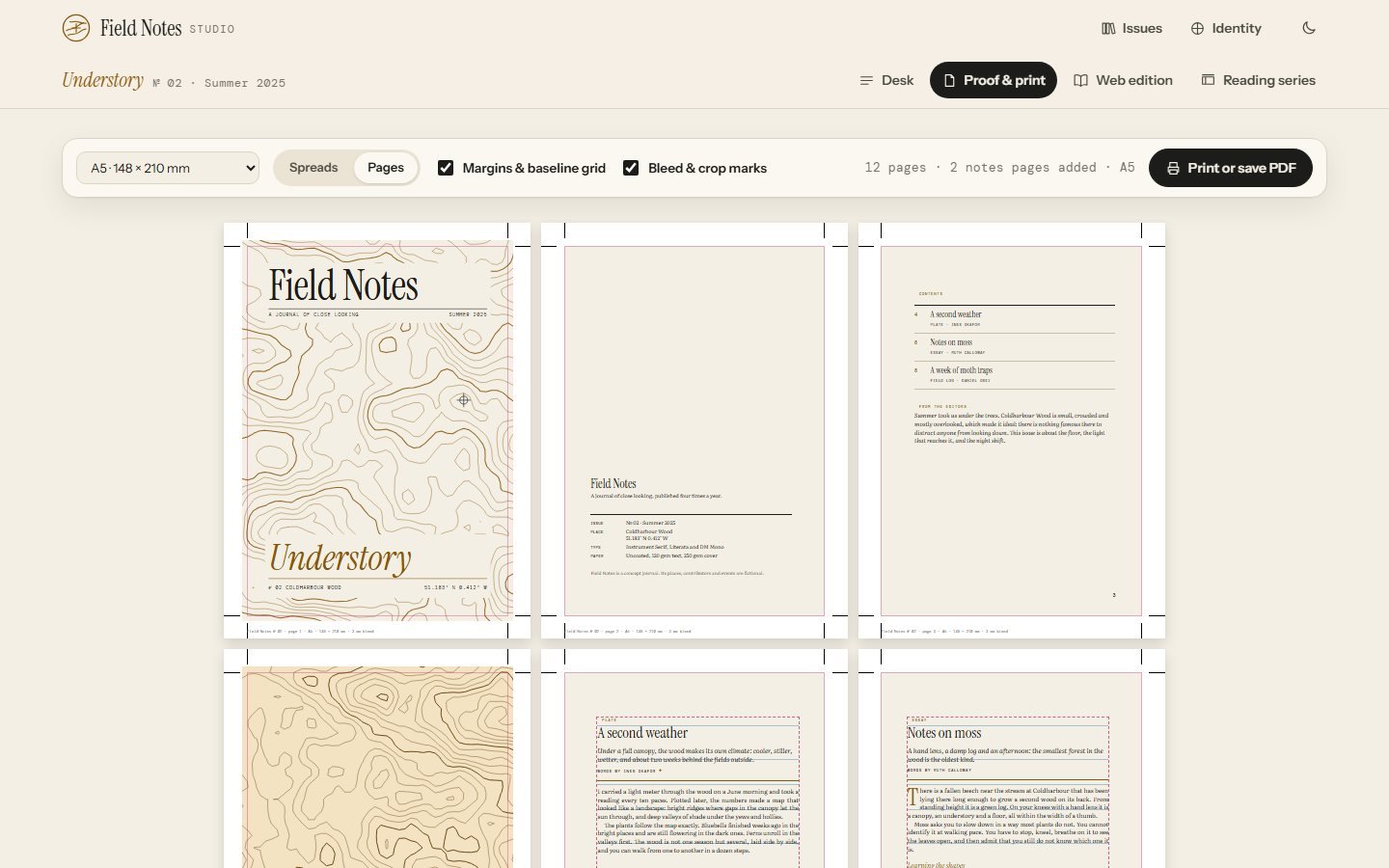
- 01
No lonely lines. A paragraph only breaks across a page with at least eight words before the break and six after.
- 02
Headings travel with their text. A subheading or log timestamp left at the foot of a page moves to the next one.
- 03
Multiples of four. Saddle-stitched issues need them, so ruled Notes pages are added before the back cover.
- 04
Preflight before print. Missing bylines, long titles and images under 300 ppi at their printed size are flagged on the desk.
if (b.type === "p") {
  const w = b.text.split(/\s+/);
  let lo = 0, hi = w.length;
  while (lo < hi) {
    const mid = Math.ceil((lo + hi) / 2);
    const part = w.slice(0, mid).join(" ");
    el.innerHTML = inline(part + F.balance(part).close);
    if (fits(frame)) lo = mid; else hi = mid - 1;
  }
  const tailOk = w.length - lo >= MIN_TAIL;
  if (lo >= w.length) { prev = "p"; firstPara = false; continue; }
  if ((lo >= MIN_HEAD && tailOk) || (empty && lo > 0)) {
    const part = w.slice(0, lo).join(" "), bal = F.balance(part);
    el.innerHTML = inline(part + bal.close);
    el.classList.add("split");
    firstPara = false;
    queue.unshift(Object.assign({}, b, { text: bal.open + w.slice(lo).join(" "), cont: true }));
    next();
    prev = "p";
    continue;
  }
}
05 / The reading series
Posters from the same land as the cover.
Each launch reading gets an A3 poster, a square post and a story card. They are drawn on a canvas from the issue's own contours and event details, so they belong to the cover without repeating it. These three are real exports.
06 / Screens
The studio, captured from the app.
Select any screen to see it larger.
07 / Try it
The real studio, with four sample issues.
This demo starts fresh each time; the full studio keeps your issues in your browser.
- 1
Start issue 05. Give it a place and coordinates, and watch the cover draw itself.
- 2
Write a piece. Add an essay or a field log, then open Proof & print to see it set into pages.
- 3
Fix the draft. Issue 04's preflight lists what a printer would send back.
Everything stays in your browser. Print to PDF from Proof & print.
Open the full studio08 / How it's built
The identity is the code; the screens just use it.
core.js holds the inks, type rules, contour generator, markup and preflight. paginate.js sets pages; poster.js draws the posters. Nothing here was laid out by hand in a design tool.
- ~1,750lines of JavaScript and CSS
- 12A5 pages for Issue 01, checked in the exported PDF
- 4article templates from one markup
- 0covers drawn by hand
- Seeded, repeatable artA small seeded random generator and four octaves of value noise mean a place always makes the same land, at any size.
- Real measurement, not guessesPagination places each block in a fixed-height frame and checks for overflow, then binary-searches the words that fit.
- Print CSS in millimetresPages, margins and bleed are set in mm and type in points; an @page rule sizes the PDF to trim, or to trim plus slug with marks.
- Emphasis that survives a page breakIf a page breaks inside italics, the first part is closed and the second reopened, so no stray asterisks print.
- Canvas postersPosters are drawn at 150 ppi for A3 with the same webfonts, and exported as PNG.
- Contrast checked in codeThe identity guide computes each ink's contrast on paper; summer's ink was darkened until it passed for text.
09 / What I'd test next
What a printer and real editors would teach it.
The system works on four sample issues. A real journal would push it in ways a demo doesn't.
Send a proof through a print shop's preflight. Browser PDFs are RGB; a real run may need a CMYK conversion step.
Test: one short print runPlain text with a few marks is quick, but footnotes, tables and image layouts would be the first requests.
Test: editors write one issueFour look different. Forty might start to feel the same; the generator may need more parameters than the coordinates.
Test: render a hundred places side by sideThe samples are short. A 5,000-word essay with images would test the break rules and the speed of measuring.
Test: a long-form issue